



Maya Pattern Animation

The animation and notes on this page explain how custom shaders written in the RenderMan Shading Language can be animated using SLIM parameter expressions.
Renderman Shader
|
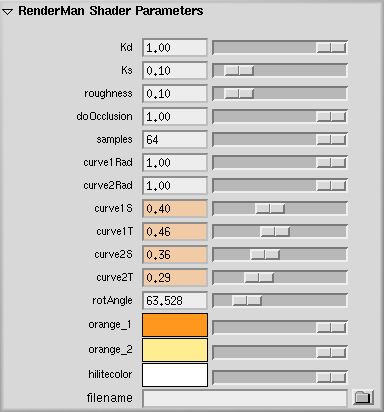
Custom Pattern My goal with this shader was to create a stylistic animated eye. By controlling
the sweep values of the two curves I was able to keyframe a simple animation of the eye blinking in Maya.
To spice things up I also had the shader progress through the color spectrum with every blink of the eye.
Adding a control to rotate the entire shader was necessary to orient the eye properly.
|
  |
Scene Creation
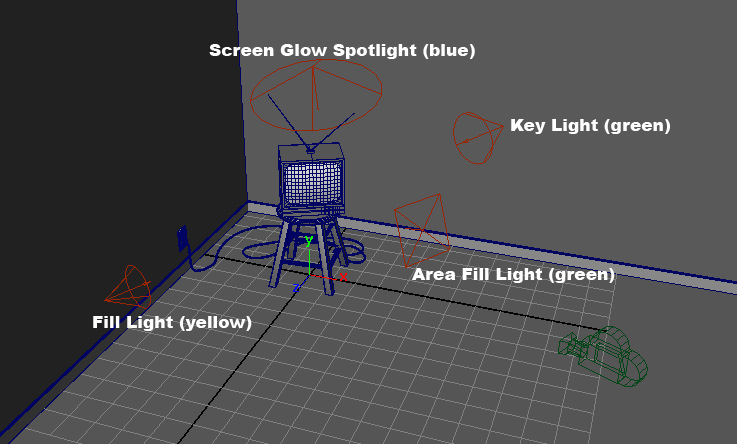
The scene was constructed in Maya using a few lights and some polygonal models I created in the past. I wanted to go for an overall dark scene with a single lit corner using primarily green hues for the lights. I positioned a blue spot light facing away from the TV onto the floor to create the glow effect coming from the screen. This light was also keyframed to match the blinking of the eye shader to add a little more complexity to the scene.
Animation
To animate the eye I had to find values for the curves that would create an image of a closed and open eye. Here are the values I ended up using:
|
Closed curve1S = 0.42 curve1T = 0.48 curve2S = 0.38 curve2T = 0.31 |
Open curve1S = 0.18 curve1T = 0.17 curve2S = 0.08 curve2T = 0.12 |
 |
 |