


Shader Writing: Fire

The animations and notes on this page demonstrate how to create a flame shader using the RenderMan shading language. This project focuses primarily on the type of flame typically generated from a lighter.
Reference Material
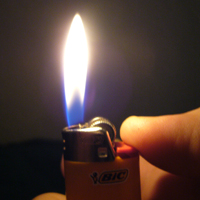
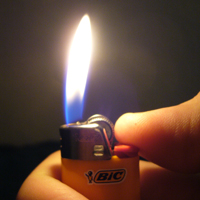
As with the previous projects, much emphasise is placed on carefully observing and documenting a natural phenomena before creating a digital version of it. Below are the reference materials I captured for this project.
 |
 |
 |
Scene Setup
|
I used a simple polygonal models for the flame and lighter geometry within the scene. The flame is a simple tapered cylineder that has a lattice attached to it to control the subtle flicker of the flame. A "key" point light is positioned directly above the flame with four child point lights below it which have reduced intensities. All of the point ligths are key frame animated as a group to recreate the flickering light qualites of the lighter. |
flash content will replace this text
|
Shader Attributes
The first quality of the lighter flame I noticed was the subtle ramp in color from blue to white to yellow/orange.
I used a spline consiting of three colors to recreate this effect. It took a little tweaking to settle on this line of
code.
surfcolor = spline((1 -t) * 0.5, c[1],c[1],c[1],c[0],c[2],c[2],c[2],c[2],c[2],c[2],c[2], Cs);
These are the colors I chose to use in my color array:
color c[3] = { color(1,1,1),
color(1.0,0.921,0.529),
color(0.4,0.4,1.0) }
I also incorporated attributes such as baseblur, basecut, edgemin, and edgemax which can all be manipulted within
Maya. The basecut and baseblur features proved to be highly useful in creaing an opacity falloff on the bottom of the
flame.
Initial Renders
|
flash content will replace this text
|
|
This is my initial render of the flame shader. I found the flame to be a little too opaque so I decided to add a new attribute
called "opacityControl". It allows for me to control the opacity of the flame by simply multiplying opacityControl, a value between
1 and 0, with my calculation for apparent opacity (Oi). |
|
flash content will replace this text
|
|
In this render I adjusted the opacity of the flame using opacityControl. I feel it is an improvement, however now I need to make the flame glow. |
Final Render
flash content will replace this text
|
|
To create the glow I isolated the flame from the rest of the scene in a seperate render layer. After rendering the background as a seperate item I imported both the flame and scene into Adobe After Effects. In After Effects I duplicated the flame and used a gausian blur to blow out the copy. A nice halo effect is created using this method giving the flame a subtle glow. |